Today seemed like an appropriate day to start finishing my album.
It's a collection of 6 of my best recent tracks, and can be found online here.
http://milkcrate.com.au/godinpants/godinpants-areyouwithus.zip
It features a reasonable amount of variance, some nanoloop, underclocked sounds, sampled drums in LSDJ, re-sampled sounds sequenced using a monome.
I'm pretty happy with it. I've printed up some covers and will be handing them out at my upcoming performance at the campus band comp.
Showing posts with label nanoloop. Show all posts
Showing posts with label nanoloop. Show all posts
Monday, July 27, 2009

Wednesday, July 22, 2009
More on underclocking.
I decided to underclock one of my DMGs today.
I didn't have the exact 2.097152MHz crystal required for a halving of pitch in tune with the original crystal, but a 2MHz crystal should be fine, and sounds great intune with itself.
Heres a few pictures of the result. And a song I wrote using the underclocked DMG and a copy of Nanoloop.
(you'll have to click on these images to see them at full size)
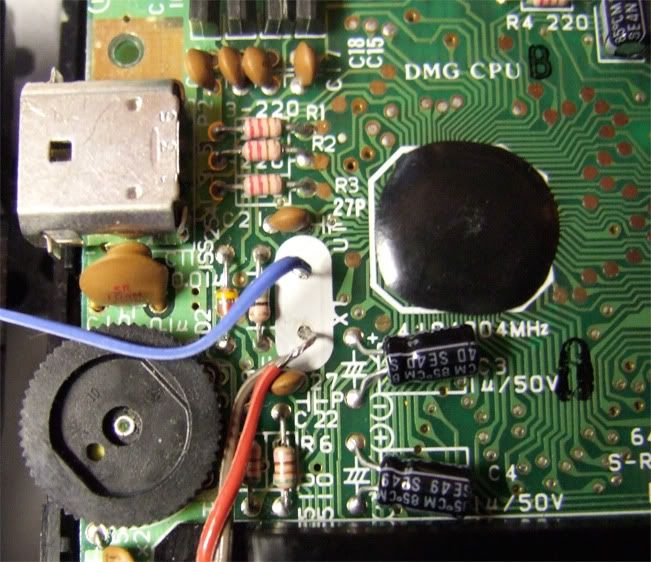
Here is where the original crystal was, and you can see the wires leading to the new crystals.
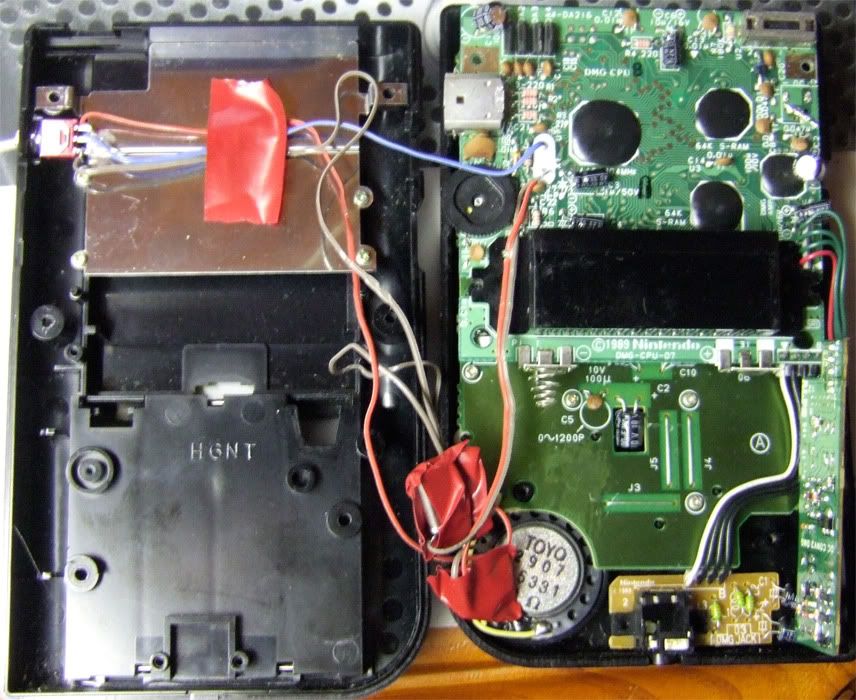
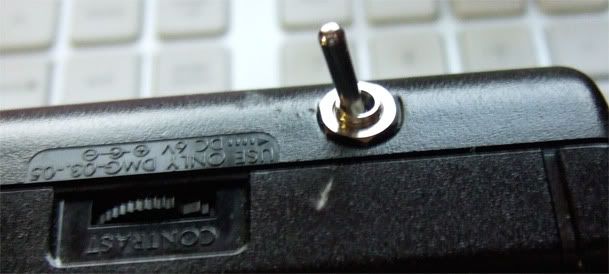
You can see where the switch was installed, and where I placed the two crystals.
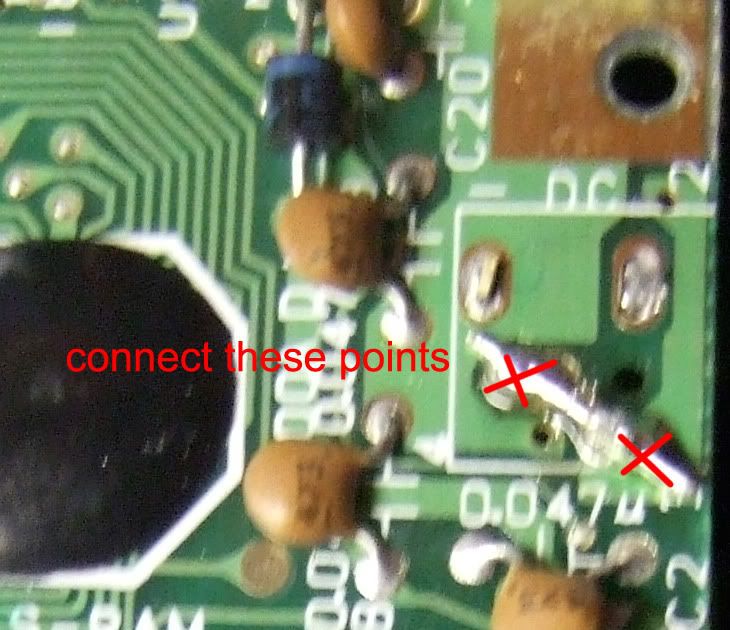
Because i removed the dc socket for switch placement, I had to bridge this part of the board so power would still run through.(if you dont do this, the gameboy just doesn't turn on)
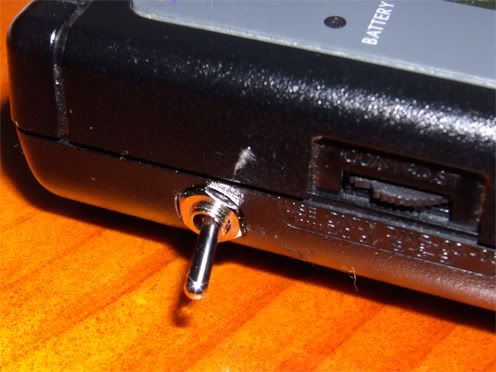
Here's a comparison of start up sounds just to show the difference, first full speed, second is half speed
I didn't have the exact 2.097152MHz crystal required for a halving of pitch in tune with the original crystal, but a 2MHz crystal should be fine, and sounds great intune with itself.
Heres a few pictures of the result. And a song I wrote using the underclocked DMG and a copy of Nanoloop.
(you'll have to click on these images to see them at full size)
Here is where the original crystal was, and you can see the wires leading to the new crystals.
You can see where the switch was installed, and where I placed the two crystals.
Because i removed the dc socket for switch placement, I had to bridge this part of the board so power would still run through.(if you dont do this, the gameboy just doesn't turn on)
Here's a comparison of start up sounds just to show the difference, first full speed, second is half speed
Monday, July 6, 2009
midi sync update
A few months ago I traded off an unused drum machine to a member of 8 bit collective in return for a midi>gb sync.
More than 6 months later, I assumed it had been lost in the post, or that I had encountered a particularly shifty individual. This led me to investigate the arduinoboy, which I built in the end.
But this morning, I received a surprise in the mail.
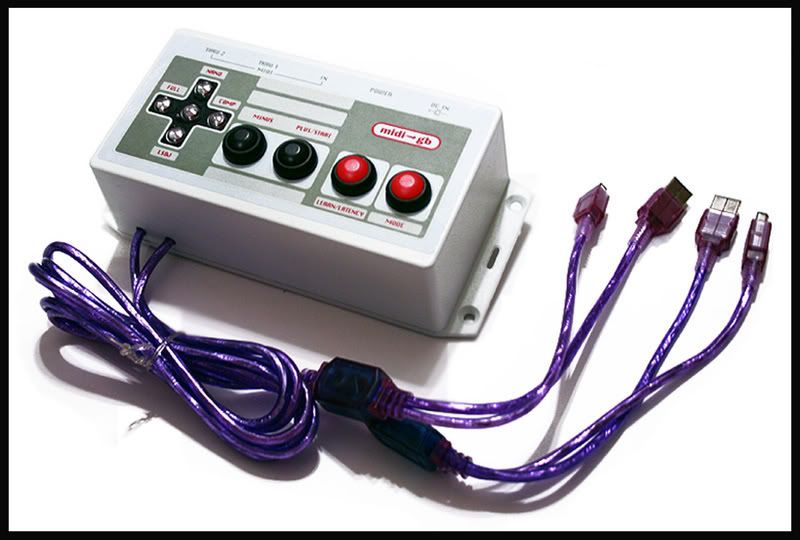
A lowgain midi>gb sync. 8bc member, and chip artist lowgain(Logan Erickson) produced a small run of these in 2008, based off the original design by FirestARTer(http://www.firestarter-music.de/lsdj/)
This device functions much like the arduinoboy, including 4 of the 5 modes(MGB support is missing). It is also contained within a much sturdier case than my arduinoboy, and much less prone to freezing on mode 2, and becoming unresponsive as my arduinoboy occasionally did(for reasons i was unable to identify).
Furthermore it contains 2 midi thru ports allowing further support of other devices.
I also received a new clear DMG, bringing my count up to 4 DMGs and 2 GBCs.
With my upcoming performance at the National Campus Band Comp, multiple consoles will come in useful for segueing between songs.
I also received a new clear DMG, bringing my count up to 4 DMGs and 2 GBCs.
With my upcoming performance at the National Campus Band Comp, multiple consoles will come in useful for segueing between songs.
More than 6 months later, I assumed it had been lost in the post, or that I had encountered a particularly shifty individual. This led me to investigate the arduinoboy, which I built in the end.
But this morning, I received a surprise in the mail.
A lowgain midi>gb sync. 8bc member, and chip artist lowgain(Logan Erickson) produced a small run of these in 2008, based off the original design by FirestARTer(http://www.firestarter-music.de/lsdj/)
This device functions much like the arduinoboy, including 4 of the 5 modes(MGB support is missing). It is also contained within a much sturdier case than my arduinoboy, and much less prone to freezing on mode 2, and becoming unresponsive as my arduinoboy occasionally did(for reasons i was unable to identify).
Furthermore it contains 2 midi thru ports allowing further support of other devices.
I also received a new clear DMG, bringing my count up to 4 DMGs and 2 GBCs.
With my upcoming performance at the National Campus Band Comp, multiple consoles will come in useful for segueing between songs.
I also received a new clear DMG, bringing my count up to 4 DMGs and 2 GBCs.
With my upcoming performance at the National Campus Band Comp, multiple consoles will come in useful for segueing between songs.
Monday, May 11, 2009
Reflection - Software.
Why am I using the software i am?
The main pieces of software i intend on using on the gameboy are as follows, LittleSoundDJ, Nanoloop 1.3 and the “Trippy H” sequencer found on the gameboy camera peripheral.
The first, LSDJ is usually considered the more advanced of the three, allowing more control over sounds produced and sequences, the ability to string sequences together, and use of the wave channel as either a synth or sample player. LSDJ also allows the use of a modified PS2 computer keyboard as a keyboard controller for the software, meaning users can step outside the general gameboy interface. The song arrangement screen makes LSDJ one of the more “musical” of the three, because users can write out an entire song and let it play back, or use “live” mode where chains of phrases can be selected. I have been using LSDJ primarily, due to the complexity of patterns it allows. I can write longer songs, with a stronger structure than i would in the other software mentioned here. I am also quite drawn towards using the sampled drumkits within the software, there is a challenge of writing original sounding beats, while utilising a maximum of 2 samples at a time, with samples having any kind of decay cut off when the next sample begins, it creates a simplicity in what can often be complex patterns.
Nanoloop is a much more simplified sequencer. It really lends itself to creating music from short loops, and live performance. Unlike the LSDJ pattern selector that only allows a user to choose phrases within the one song, or save file, Nanoloop allows a user to access all saved phrases and swap between them, either one at a time, or a whole “column”. Unlike LSDJ which makes use of the wave channel as a sample player, Nanoloop contains a “special”wave channel, where a custom waveform can be played back. This does though, force users to create all drum sounds with either the noise channel, or a combination of a pulsewave kick and noise high hats/snares. I feel like this leaves Nanoloop creating more “authentic” game sounds, leaving behind the sampled kits used by LSDJ.(However Gameboy games did occasionally make use of the sample playback ability of the wave channel) I enjoy using nanoloop, because it allows a certain level of improvisation, which i feel is important in the way i create music. It is this same feature though, that sometimes limits me from “finishing” songs, most of my music written in nanoloop never really reaching a finishing point, patterns and parts are continually reused and reintroduced for different songs.
The final piece of software “trippy H” is a simple 16 step, 3 channel(pulse, pulse, noise) sequencer with user controlled sample playback(an assortment of blips and other videogame type sounds). It was included as an unlockable extra in the gameboy camera software. Users had to complete a top scrolling shooter, upon which a third ship labelled “dj” apeared at the beginning. The difficult to navigate nature of the software(designed as a toy rather than a tool for musical tool) on top of the limit of three save files, makes music from trippy H difficult to compose and perform. This is usually overcome by users recording song data and rearranging in a computer based DAW. The limitations of trippy H are what cause it to thrive in a sense, on live performance, with its minimalistic approach to music, changes must be made slowly, often only at a rate of one note per cycle. I feel if trippy H were able to sync with external sources such as drum machines or software like LSDJ, it would be a much more valuable tool in the creation of minimalistic micromusic.
The main pieces of software i intend on using on the gameboy are as follows, LittleSoundDJ, Nanoloop 1.3 and the “Trippy H” sequencer found on the gameboy camera peripheral.
The first, LSDJ is usually considered the more advanced of the three, allowing more control over sounds produced and sequences, the ability to string sequences together, and use of the wave channel as either a synth or sample player. LSDJ also allows the use of a modified PS2 computer keyboard as a keyboard controller for the software, meaning users can step outside the general gameboy interface. The song arrangement screen makes LSDJ one of the more “musical” of the three, because users can write out an entire song and let it play back, or use “live” mode where chains of phrases can be selected. I have been using LSDJ primarily, due to the complexity of patterns it allows. I can write longer songs, with a stronger structure than i would in the other software mentioned here. I am also quite drawn towards using the sampled drumkits within the software, there is a challenge of writing original sounding beats, while utilising a maximum of 2 samples at a time, with samples having any kind of decay cut off when the next sample begins, it creates a simplicity in what can often be complex patterns.
Nanoloop is a much more simplified sequencer. It really lends itself to creating music from short loops, and live performance. Unlike the LSDJ pattern selector that only allows a user to choose phrases within the one song, or save file, Nanoloop allows a user to access all saved phrases and swap between them, either one at a time, or a whole “column”. Unlike LSDJ which makes use of the wave channel as a sample player, Nanoloop contains a “special”wave channel, where a custom waveform can be played back. This does though, force users to create all drum sounds with either the noise channel, or a combination of a pulsewave kick and noise high hats/snares. I feel like this leaves Nanoloop creating more “authentic” game sounds, leaving behind the sampled kits used by LSDJ.(However Gameboy games did occasionally make use of the sample playback ability of the wave channel) I enjoy using nanoloop, because it allows a certain level of improvisation, which i feel is important in the way i create music. It is this same feature though, that sometimes limits me from “finishing” songs, most of my music written in nanoloop never really reaching a finishing point, patterns and parts are continually reused and reintroduced for different songs.
The final piece of software “trippy H” is a simple 16 step, 3 channel(pulse, pulse, noise) sequencer with user controlled sample playback(an assortment of blips and other videogame type sounds). It was included as an unlockable extra in the gameboy camera software. Users had to complete a top scrolling shooter, upon which a third ship labelled “dj” apeared at the beginning. The difficult to navigate nature of the software(designed as a toy rather than a tool for musical tool) on top of the limit of three save files, makes music from trippy H difficult to compose and perform. This is usually overcome by users recording song data and rearranging in a computer based DAW. The limitations of trippy H are what cause it to thrive in a sense, on live performance, with its minimalistic approach to music, changes must be made slowly, often only at a rate of one note per cycle. I feel if trippy H were able to sync with external sources such as drum machines or software like LSDJ, it would be a much more valuable tool in the creation of minimalistic micromusic.
Tuesday, April 14, 2009
Nanoloop
Nanoloop is one of the two most popular alternatives for creating music on the Gameboy(the other being LSDJ)
Two versions of nanoloop are available currently, 1.5 which runs on the DMG, GBC and GBA, and 2.3 which will run on GBA and DS.
1.5's sound producing abilities are as follows
Where as 2.4 is capable of
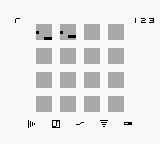
The interface for nanoloop is simple, 16 blocks indicate the 16 steps of a loop. By pushing the select key, the bottom menu becomes accessible, allowing the user to change channels, or editing mode.(volume, pitch, filter/slides/fm/arpeggio, waveform, panning/tempo) Pushing select again, opens up the second menu which contains the ability to saveparts, edit waveforms, and arrange songs.
There is no text in nanoloop, except for numbers indicating tempo and save files. Pitch and other parameters are indicated by 2 bars in each step of the sequencer, the left side usually being a harsh adjustment(octaves for pitch) and the right being finer(semitones in pitch).
The simplicity of this design makes it possible for someone with no music experience to step in and begin making music.
"The idea of nanoloop is to simplify the stepsequencer concept as far as possible while keeping the gamesome, addictve character of loop-based music creation. The minimalistic graphical user interface was specifically developed for the Game Boy's small screen and has been optimized for keypad operation. Despite the simple design and usage, it provides access to the raw sound synthesis components and allows to create complex musical structures.
Nanoloop originally started as a study experiment in interface design back in 1998. It has been developed into a stable tool since and quickly became popular among musicians and artists as well as novices in electronic music."O, Wittchow(www.nanoloop.com)
Two versions of nanoloop are available currently, 1.5 which runs on the DMG, GBC and GBA, and 2.3 which will run on GBA and DS.
1.5's sound producing abilities are as follows
- R: rectangular wave with variable pulse width
- L: rectangular wave with variable pulse width
- S: custom 4-bit wave forms (16 waves per bank)
- N: shift register noise generator
Nanoloop 1.5 generates an additional voice on the cart which is added to the L-channel and usable for intervals or detune / phasing effects
Where as 2.4 is capable of
- R: rectangular wave, pulse width + filter or FM, modulator freq + modulation depth
- L: rectangular wave, pulse width + filter or FM, modulator freq + modulation depth
- S: as R but with 4-voice polyphony and stereo phasing effect
- N: pseudorandom noise generator with filter
The interface for nanoloop is simple, 16 blocks indicate the 16 steps of a loop. By pushing the select key, the bottom menu becomes accessible, allowing the user to change channels, or editing mode.(volume, pitch, filter/slides/fm/arpeggio, waveform, panning/tempo) Pushing select again, opens up the second menu which contains the ability to saveparts, edit waveforms, and arrange songs.
There is no text in nanoloop, except for numbers indicating tempo and save files. Pitch and other parameters are indicated by 2 bars in each step of the sequencer, the left side usually being a harsh adjustment(octaves for pitch) and the right being finer(semitones in pitch).
The simplicity of this design makes it possible for someone with no music experience to step in and begin making music.
Subscribe to:
Posts (Atom)